|
|
 |
|
|
| |
Keeping It Sharp
Discover How A Tripod Can Be Your Best Weapon Against Soft Images
By Ibarionex R. Perello
|
|
| |
|
|
| |
Few things are more frustrating to a photographer than an unsharp picture. A soft image may look fine on a digital camera's LCD screen, but when viewed on a computer monitor, the image's lack of sharpness is both apparent and aggravating. Yet, the fault often lies not with the camera or even the lens, but with the slight vibration that's caused by depressing the shutter-release button. A tripod can eliminate this problem and ensure a razor-sharp picture.
You may imagine a tripod as a bulky, unwieldy thing, but today's models can be small, lightweight and incredibly portable. There's a tripod that fits both the needs of your photography and the limits of your wallet.
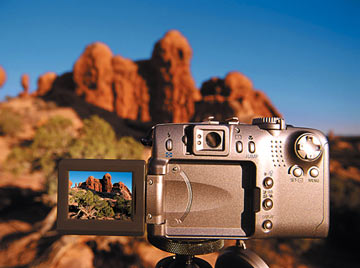
Why A Tripod?
If you're photographing outside on a bright sunny day, the camera's shutter speed will be relatively high: 1/125 sec. or faster. For most situations, this is fast enough to negate any adverse effect of camera motion. However, if you have a long telephoto zoom, e.g., 135mm or higher, a shutter speed of 1/125 sec. won't be enough to ensure sharpness. That's because the longer focal length magnifies any motion. It becomes even more difficult to ensure a sharp image if the light level drops and the shutter speed is reduced.
A tripod provides a stable platform for practically any type of photography: portraits, close-up or scenics. It not only minimizes the adverse affect of camera movement, but also allows you to use slower shutter speeds.
For close-up work, for example, you might choose to use a small aperture to achieve greater depth of field. The resulting shutter speed, even under good light, might be 1/30 sec. or slower. By placing the camera on a tripod, you ensure that the resulting image will be tack-sharp.
The same goes whether you're shooting a portrait or a landscape. Provide a solid and steady resting place for your camera, and the frustration of a soft image is significantly reduced.
Starting Off
 The majority of digital cameras are incredibly compact and don't require a large, heavy tripod. A tabletop tripod can be stored in a jacket pocket or a camera bag and set up virtually anywhere. The majority of digital cameras are incredibly compact and don't require a large, heavy tripod. A tabletop tripod can be stored in a jacket pocket or a camera bag and set up virtually anywhere.
The Hakuba Clear Flexi Pod weighs only one ounce and is compact enough to fit in a shirt pocket. Its flexible legs can conform to any position and provide an operating height of 4.5 inches. Not only can you set it on a table or chair, but you can also brace it against a vertical wall to minimize vibration.
For greater flexibility, the Manfrotto Digi-Table-Top tripod offers a miniature ballhead. This makes it easy to position the camera for horizontal or vertical compositions. Its fully articulated legs allow you to set up your compact digital camera on virtually any surface.
The Giottos Q-Pod II offers telescoping legs that deliver a maximum working height of almost eight inches. The mini-tripod features a quick-release plate that allows you to remove the camera from the tripod within seconds. Designed with a titanium finish, the unit weighs less than four ounces.
Using a compact tripod in conjunction with the camera's self-timer is a great tool even if you aren't included in the picture. The delay will eliminate the chance of camera movement affecting your image. Just compose your photograph, engage the self-timer, depress the shutter release and let the camera do all the work.
| Tripod
Specifications |
Weight |
Max.
Height |
Min.
Height |
Max.
Load |
| Mini-Tripods |
| Hakuba Clear
Flexi Pod |
2.1 oz. |
5 in. |
n/a |
n/a |
| |
| Manfrotto
Digi-Table-Top |
3.2 oz. |
3.54 in. |
n/a |
4.5 lbs. |
| |
| Giottos Q-Pod
II |
3.7 oz. |
7.75 in. |
3 in. |
n/a |
| |
| Medium
Tripods |
|
|
|
|
| Slik Sprint
Pro |
1.9 lbs. |
64 in. |
23.2 in. |
3.5 lbs. |
| |
Gitzo Mountaineer
Weekend (G1028) |
1.7 lbs. |
37 in. |
16 in. |
6.6 lbs. |
| |
| Sunpak 2026UT |
4.6 lbs |
49 in. |
18.5 in. |
2.8 lbs. |
| |
| Phoenix Alleycat |
1.6 lbs. |
50.7 in. |
15.5 in. |
n/a |
| |
| Large
Tripods |
|
|
|
|
| Manfrotto
3021BN |
5.1 lbs |
53.2 (70.1*)
in. |
3.2 in. |
13.3 lbs. |
| |
| Davis &
Sanford Magnum XL |
5.3 lbs. |
69.3 in. |
30 in. |
9 lbs. |
| |
|
|
|
|
|
*center column extended |
Medium-Size Tripods
Many of today's tripods, especially medium-sized models, are incredibly lightweight because of their use of special aluminum alloys or carbon-fiber materials. You experience all the benefits of a tripod without taking on the burden of bulk and weight.
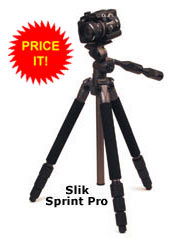
The Slik Sprint Pro tripod weighs less than two pounds, but provides a maximum height of 64 inches. Position it as close as 6.4 inches above the ground for effectively composing images of small objects.
Made of carbon fiber, the Gitzo Mountaineer Weekend Tripod (G1028) supports up to 6.6 pounds of camera equipment, but weighs less than two pounds. This rugged tripod is suitable for both compact and SLR digital cameras in a small studio or out in the field.
Featuring a quick-release mounting plate, the Sunpak 2026UT provides a maximum height of 49 inches while weighing only 37 ounces. It includes a three-way pan head with separate locking controls.
Weighing less than 27 ounces, the Phoenix Alleycat tripod includes a two-way pan head for an SLR or compact digital camera. It offers a maximum height of 50.7 inches and includes a center brace to deliver increased stability. Its lightweight size makes it ideal for travel.
When evaluating a tripod, the maximum height specification may reflect the fact that the center column is fully extended. Though convenient, minimize your use of the center column to achieve greater height. This is because the camera is less stable and more susceptible to sharpness-killing vibration when the column is elevated. Try to avoid using the center column beyond its halfway point if possible.
Compact tripods often come with their own carrying case or are compatible with a carrying strap. The latter is highly recommended because it makes toting and setting up the tripod quicker and easier.
Heavy-Duty Tripods
Heavier and more full-featured tripods should be considered for digital SLRs using interchangeable lenses. For digital cameras that use a super-telephoto lens such as 300mm or longer, a sturdy tripod is indispensable.
Usable with both digital still and video cameras, the Davis and Sanford Magnum XL tripod includes a three-way fluid head. The tripod head delivers smooth movement for videography and increased precision for still work. It also features easy-grip, cushioned legs, a built-in bubble level and a handy, reversible center post.
Resources
Bogen Photo
(Manfrotto, Gitzo)
(201) 818-9500
www.bogenphoto.com
Hakuba
(800) 423-1623
www.hakubausa.com
HP Marketing (Giottos)
(800) 735-4373
www.hpmarketingcorp.com
Phoenix Corp.
(516) 764-5890
www.phoenixcorp.com
THK Photo (Slik)
(800) 421-1141
www.thkphoto.com
ToCAD (Sunpak)
(973) 428-9800
www.tocad.com
|
The Manfrotto 3021BN tripod is lightweight, but capable of handling SLRs and super-telephoto lenses. It weighs only five pounds and offers a maximum height of 53.2 inches (70.1 inches with the center column raised). The legs are quickly adjusted using rapid-action levers, and the tripod includes a low-angle adapter built into the center column for positioning the camera inches away from your macro subjects.
When evaluating tripods, consider the maximum weight you expect to load onto the model. Evaluate the design of the legs and the mechanism used to lock and release them. Some legs may use a twisting mechanism to lock and secure a leg, while others will have a flip-lock control. Test each design to see which tripod model you prefer.
Heads
Tilt-and-pan tripod heads offer independent controls for moving the camera vertically or horizontally. The familiarity of these controls makes using a head very easy from the moment it's pulled out of the box. They can be more affordable than ballheads, but provide just as stable a platform for your digital camera.
Manufactured around a ball-and-socket design, a ballhead delivers complete freedom of movement using a single control lever. When tension is released, the camera can be oriented into any position within seconds. It's important, however, to make sure that you've locked the tripod head in place before releasing your grip on the camera, as failure to do so will result in the camera tipping over.
Whether you choose a compact tripod or a standard-size tripod, you'll soon discover that more and more of your images will be sharper than they would have been had you simply handheld your camera.
|
|
|

Home | Articles
& Reviews | Current
Issue | Past Issues
Staff & Contributors | Photo
Books | HelpLine
| Glossary
Advertiser
Info | Links | Shopper
| Subscriptions | Back
Issues
Account Inquiry | Submissions
| Contact Us | About
Us
PCPHOTO Magazine
is a publication of the Werner Publishing Corporation
12121 Wilshire Boulevard, 12th Floor, Los Angeles, CA 90025
Copyright© 2026 Werner Publishing Corp.
|
|






















|