|
 |
 |
|
|
| |
The Digital
Marriage
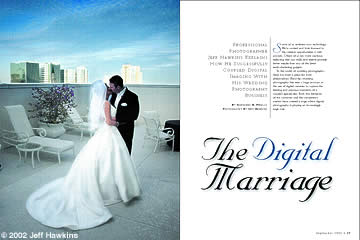
Professional Photographer Jeff Hawkins Explains
How He Successfully Coupled Digital Imaging With His Wedding
Photography Business
By Ibarionex R. Perello
Photography By Jeff Hawkins |
|
| |
|
|
| |
|
|
| |
Some of us embrace new technology. We’re
excited and look forward to the creative opportunities it will
provide. Others of us are more cautious, believing that our
skills and talents provide better results than any of the latest
earth-shattering gadgets.
In the world of wedding photography, there has been a place
for both philosophies. Recently, wedding photography has seen
a huge increase in the use of digital cameras to capture the
fleeting and precious moments of a couple’s special day.
Both the demands of the customer and the competitive market
have created a stage where digital photography is playing an
increasingly large role. |
|
| |
|
|
| |
 |
|
| |
|
|
| |
For photographer Jeff Hawkins, co-author
of Professional Techniques For Digital Wedding Photography
(Amherst Media: ISBN 1-58428-073-5), the enthusiastic decision
to move into digital has proven not only financially beneficial,
but has also freed him creatively. It has allowed Hawkins to
create a distinction between him and his competition.
“When I started, there was nobody doing it,” says
Hawkins, who points out there were no books or seminars to turn
to for help in grasping this emerging technology. A person had
to take an almost fearless dive into the digital unknown. “I
learned a lot, but it was mostly trial and error,” he admits.
Hawkins began using computers in 1992 for database applications.
Hoping to improve on efficiency, he started expanding his use
of computers by scanning film and creating a digital collection
of the wedding day. Then, he’d use these images to create
a videotape, a TV-friendly proof book that the couple and family
could view for evaluating and selecting their images. Using
video rather than a bound proof album was beneficial in a variety
of ways, including the reduction in time and effort in compiling
the book itself. It also eliminated the need to ship the book
and the concerns about its handling.
Hawkins’ success with this method led him to a sincere
interest in making the conversion to a complete digital workflow.
However, he was dissuaded early on, due to the lack of professional
image quality in early digital cameras.
With the introduction of the Nikon D1, however, Hawkins believed
the technology had finally arrived that would deliver the quality
and performance he was demanding. After 22 years of shooting
professionally with film, he was ready to begin a transition
that would significantly change his art and his business.
“For the first two or three weddings, we shot both film
and digital,” he explains. “We shot digital for the
candid portion and film for the formals. I liked what I was
seeing [in the pictures].”
Though Hawkins was very pleased with the quality of the digital
images, he was less than enthused about the work that came afterward.
Since he was shooting simultaneously with film and digital,
it made the numbering and cataloging of all the images that
much more difficult. “What a headache,” he recalls.
“That was an issue I was looking forward to getting away
from.”
To his surprise, the complete transition to digital happened
within the span of only three weddings. He was soon photographing
the entire wedding, including formals, using the digital SLR,
though he always kept his film cameras at the ready in case
of emergency.
His workflow during a wedding, while emphasizing the creation
of beautiful and exciting photographs, stresses the importance
of being both a skilled photographer and computer user. The
images are recorded on either high-capacity Lexar CompactFlash
cards or an IBM Microdrive. His assistant then downloads the
pictures to a laptop computer. All the images are backed up
on Think Computer Products’ Fire-n-Ice External Hard Drive
[www.thinkmemory.com].
This way, the images are safe, should anything happen to the
laptop or its hard drive.
After a day’s shoot, Hawkins copies the images to the server
at his office. “Sunday night, I run a tape backup of the
server,” he says. This consistent routine ensures that
the all-important images are well-protected.
Then it’s time to edit the images. Says Hawkins, “I’ll
create a work folder and a videotape proof book. That used to
take a week. I now do it in half a day.” The time that
had once been dedicated to cutting negatives, editing, numbering
and scanning is instead used for the more creative aspects of
his job. The work folder, which consists of copies of his original
images, will be the photographs he’ll edit and enhance,
thus leaving the originals intact and unedited.
“Some photographers think that they’ll be spending
their lives in front of the computer,” Hawkins says, commenting
on many photographers’ reluctance to invest in the technology.
“Sure, you’ll be spending more time there, but that’s
why it’s important to develop an effective workflow.”
He also stresses the benefits of having an assistant handle
some of the more time-consuming and repetitive tasks. “You’ll
be perfecting your image,” he adds, explaining that he
has found more time to experiment with enhancing his images
and creating unique, striking photographs for his clients.
“Learning Photoshop is very essential,” Hawkins advises,
though he admits he didn’t learn everything from the many
books he purchased. “The books just ended up sitting on
the shelf.” Instead, he found that he gleaned much of his
knowledge by just sitting in front of the computer and experimenting.
He also gained a wealth of experience and techniques from his
involvement in groups and organizations such as N.A.P.P. (National
Association of Photoshop Professionals). This forum of experienced
users provided him with the chance to learn the tools he’d
eventually incorporate into his photographs.
Hawkins believes that image editing provides a great opportunity
to enhance a photograph, but it’s easy to get carried away.
“There’s a definite ‘cheese factor’ involved,”
he says. Special effects such as soft focus, double exposures
and unusual lighting effects may be interesting, but can quickly
turn gimmicky when overdone. “Those things can get old.
You want something to be timeless.”
While a photographer certainly wants to develop a distinctive
style, Hawkins explains that it’s the subject and the photograph
that have to be the focal point, not the technology behind it.
When it comes time for him to select images to enhance using
digital effects, he tries to keep it simple. “As I’m
going through the images, I pick about 10 images. I can then
convert them into sepia or black-and-white images.” He’ll
also apply multiple techniques, such as converting an image
to black-and-white, except for a specific colorful item such
as the bride’s bouquet.
“If I’m trying something different, I’ll get
a response from my wife or assistant,” Hawkins says. He
looks for feedback to see whether he’s on track or going
over the top with applying various effects. “You can get
too close to it, and it’s sometimes hard to look at it
objectively.”
Though he’s excited by the flexibility and control the
technology provides him, Hawkins doesn’t trumpet to clients
the fact that he’ll be using digital cameras and computers.
“We never had to explain our equipment before. They just
liked our images,” he shrugs. Though he’ll share what
technology he’s using if asked, he believes it’s the
photographs themselves and not the tools used to create them
that are important to most of his clients.
Yet, the technology can be used for a greater appreciation of
the photography. Hawkins achieves this by producing a slide
presentation of the day’s images during the reception.
He’ll edit the images and, using a digital projector, present
the wedding photographs to the glee of the couple and their
guests.
He admits that his clients enjoy the immediacy of these images,
but he feels it’s important to emphasize the quality of
the images rather than the speed with which they can be delivered.
“Though we have the ability to do it fast, we don’t
necessarily want them to focus on that,” he says. “They
have a tendency to believe it’s sub-quality because it’s
done so fast.”
Speed can help business, however. His clients are often able
to view their wedding photographs while still on their honeymoon.
After being edited, low-resolution images are created and uploaded
to a password-protected Website. There, the couple, as well
as family and friends, can view the images from the wedding
day and choose the images that will make up their photo album.
Hawkins admits there was a significant initial investment in
hardware, but the equipment quickly paid for itself. He saved
several thousand dollars in film processing and proofs in just
the span of the first two all-digital weddings. However, his
business has benefited greatly by the reinvestment of some of
those savings in upgrading and expanding on equipment.
He recognizes that many photographers are hesitant about making
the leap into the digital arena, but believes that in order
to stay competitive, a professional photographer will need to
make the transition. “Just because it’s digital, it
doesn’t mean you have to start learning photography all
over again,” he assures. “Don’t be afraid to
ask questions and learn what other photographers are doing.”
Hawkins has shared much of what he has learned in his latest
book. He not only discusses the technical aspects of incorporating
digital into a photography business, but also emphasizes the
importance of research and a clearly thought-out plan of action.
“When it comes to technology, I jump into it and implement
it right away and use it,” he says. Yet, he warns photographers
about investing in equipment that only sits on a shelf, collecting
dust. “If you don’t want to make the big plunge, purchase
a less expensive camera and get your feet wet. The lower-resolution
cameras may not provide the best quality available, but they’ll
give you the chance to gain confidence.” |
|
| |
|
|
|

Home | Articles
& Reviews | Current
Issue | Past Issues
Staff & Contributors | Photo
Books | HelpLine
| Glossary
Advertiser
Info | Links | Shopper
| Subscriptions | eStore
Account Inquiry | Submissions
| Contact Us | About
Us
| Privacy Statement
|
|
Click here for

























|